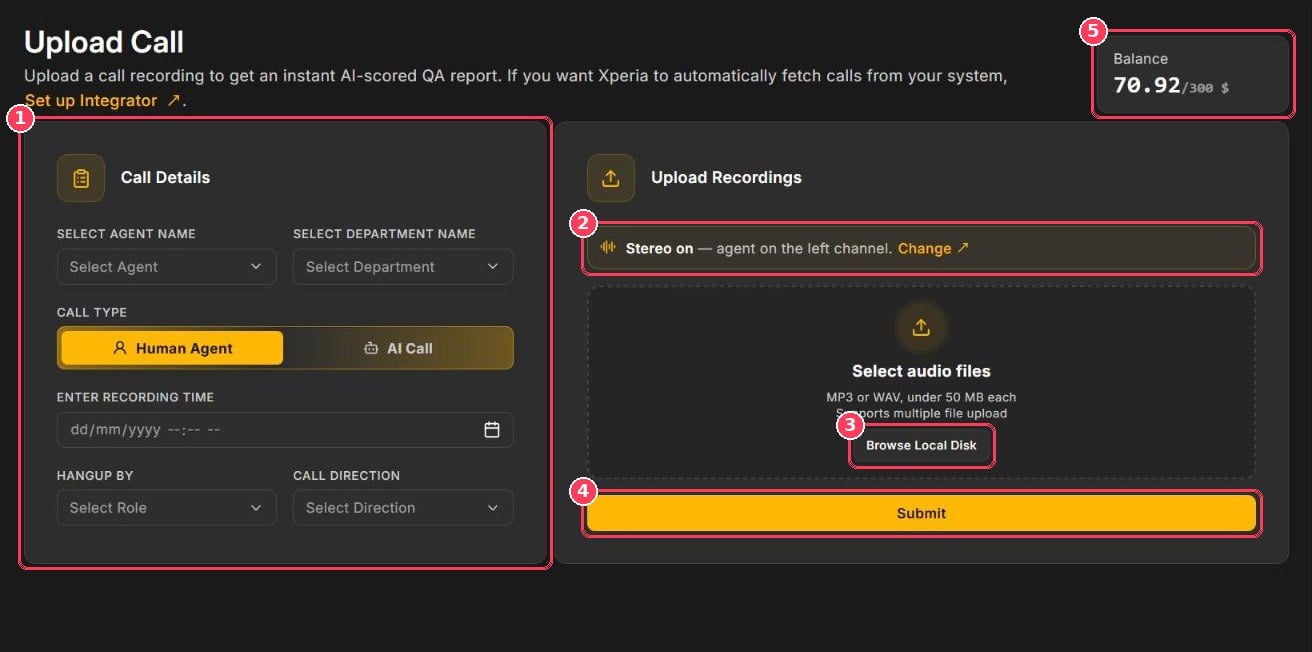
Upload Call page
Supported files
Formats
MP3 or WAV
Size
Under 50 MB per file
Batch
Multiple files per upload
Upload a call
1
Select the agent
In Select Agent Name, choose the agent who handled the call. Results appear under this name on the Dashboard and in Agent Reports.
2
Select the department
In Select Department Name, choose the department. Its parameter set and weightage are used to score the call.
3
Choose the call type
Select Human Agent for a call handled by a person or AI Call for a call handled by an AI voice agent.
4
Enter the recording time
Pick the date and time the call actually took place.
5
Set Hangup By and Call Direction
6
Confirm the stereo setting
Check the stereo banner (callout 2). If agent and customer are on the wrong channels, click Change.
7
Add the recordings
Click Browse Local Disk and select one or more MP3/WAV files.
8
Submit
Click Submit. Scored calls appear in Call Scoring with the status New.
Best practices for accurate scores
- Upload the original recording. Re-encoded or heavily compressed audio reduces transcription accuracy.
- Use stereo when available. Scoring each speaker on their own channel is the most accurate option.
- Pick the correct department. Different departments can have different parameters and weightage.
- Enter the real recording time. Reports and trends are based on it.
Troubleshooting
The file won't upload
The file won't upload
Make sure it is an MP3 or WAV file under 50 MB. Convert other formats (M4A, OGG, AAC) first.
The call shows 'Error while processing!'
The call shows 'Error while processing!'
The recording could not be scored — usually because the audio is corrupt or silent. Re-upload the original file. If the error repeats, contact support with the file name.
The agent's score looks wrong
The agent's score looks wrong
Check the stereo channel. If the agent and customer channels are swapped, the agent is scored on the customer’s words.
Submit doesn't work
Submit doesn't work
Check your balance (callout 5). If it is low, top up on the Billing page.