
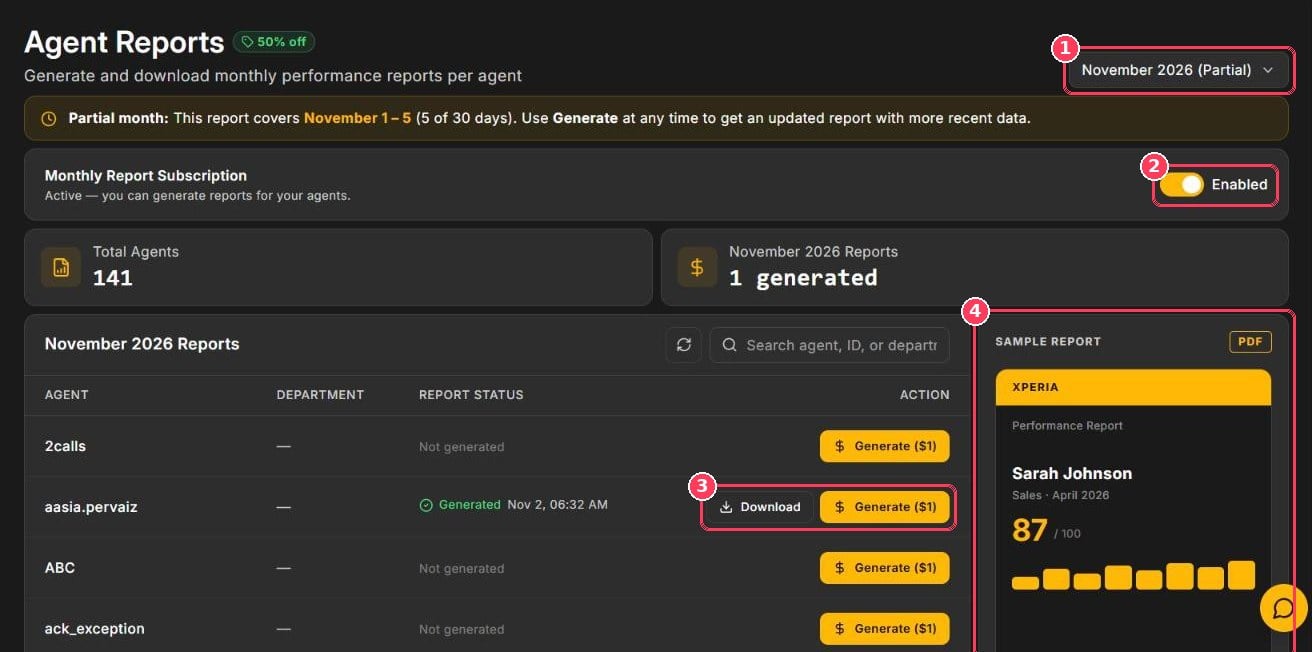
Agent Reports page
The page also shows Total Agents, the number of reports generated for the selected month, and a searchable table of every agent with their department and Report Status (Not generated or Generated with a date and time).
Generate a report
1
Choose the month
Use the month selector in the top-right corner.
2
Find the agent
Search by agent name, ID, or department, or page through the table.
3
Generate
Click Generate ($1) in the agent’s row. The status changes to Generated.
4
Download
Click Download to save the PDF.
Partial month: for the current month, a banner shows which days are included (for example November 1 – 5). Click Generate again later to get an updated report.
Pricing
What’s inside the report
Overall score
The agent’s average score for the month.
Parameter-wise scoring
Performance on every parameter across all calls.
Month-over-month trends
How the agent is improving over time.
Coaching playbook
Strengths, gaps, and recommended next steps.